

Glam AI: Video & Photo Editor
Glam Labs, Inc.
Screenshots





editor reviews
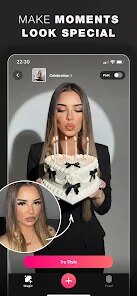
Glam AI is designed as an all-in-one media enhancement tool that takes the intimidation out of photo and video editing. At its core, the application focuses on using artificial intelligence to automate complex adjustments that would normally require professional software knowledge. Whether you want to retouch a selfie, change your hairstyle digitally, or apply cinematic filters to a short clip, the app aims to make these tasks accessible to everyone without needing a background in graphic design.
The intended audience is surprisingly broad. It specifically appeals to social media enthusiasts who post content daily and want their visuals to stand out. But it also serves busy professionals who need quick, polished headshots for LinkedIn or company profiles without booking a photographer. I personally used it when preparing event photos for a family gathering. Some relatives wanted smoother skin and better lighting in group shots taken on older phones, and Glam AI handled these corrections in seconds. The main problem it solves is bridging the gap between high-quality output and minimal user effort.
Core features perform remarkably well. The AI skin retoucher is subtle compared to many apps that leave faces looking plastic. The video enhancement capabilities surprised me - it can stabilize shaky footage and adjust color grading without needing to manually tweak sliders. Additional features like AR masks, background replacement, and themed filters add genuine value, though some feel more gimmicky than essential. I found the aging filter entertaining, but it would never be something I use for serious content. Ultimately, I recommend this to anyone who values their time more than learning complicated editing workflows. Content creators on tight deadlines will find it particularly useful, as will anyone who simply wants better-looking memories without spending hours behind a computer screen.
features
- 📸 AI Skin Retouching detects facial features and applies natural-looking corrections that preserve skin texture rather than creating a plastic appearance. You can adjust intensity to maintain authenticity while smoothing imperfections.
- 🔄 Background Replacement uses smart segmentation to isolate subjects accurately even with challenging elements like hair or glasses. It works on both photos and videos, swapping environments without tedious masking work.
- 🎨 Magic Avatars generates stylized versions of yourself in different artistic styles ranging from anime to oil painting. This feature processes multiple variations from a single upload, giving you options for different platforms or moods.
- 🎬 Video Color Grading applies presets that analyze your clip's lighting conditions and adjust shadows, highlights, and saturation automatically. This eliminates the need to understand histograms or color wheels.
pros
- ⭐ Processing speed is genuinely impressive. Most edits apply in under five seconds, and batch operations handle entire albums without noticeable slowdown.
- ⭐ The interface prioritizes clarity over flashiness. Every tool has clear labels and preview thumbnails, so you rarely guess what a button does before tapping it.
- ⭐ Export quality maintains original resolution without compression artifacts. This matters when sharing to platforms that already reduce quality further.
cons
- ⚠️ Certain filters apply inconsistently across skin tones, sometimes washing out darker complexions or making lighter ones appear overly saturated.
- ⚠️ Free version limitations are aggressive. Watermarks appear on most outputs, and premium features lock behind a subscription that feels steep for occasional use.
- ⚠️ Object removal tool struggles with complex backgrounds containing multiple overlapping elements, often leaving visible artifacts that require manual cleanup.
Recommended Apps
![]()
Poe - Fast AI Chat
Quora, Inc.4.7

![]()
Meitu- Photo Editor & AI Art
Meitu (China) Limited4.5![]()
Which Animal Are You?
KDR Games4![]()
Yahoo Mail – Organized Email
Yahoo4.6![]()
Gorilla Skins for Monkey Arena
Dumitru Boico4![]()
Find my Phone - Clap, Whistle
FunGear inc4.4![]()
Meta AI
Meta Platforms, Inc.4.7![]()
TickTock-TikTok Live Wallpaper
TikTok Pte. Ltd.4.5![]()
Kpop Idol Simulator
Brain Freezing3.8![]()
Google Pay
Google LLC4.4![]()
Photo Tool
COLIFER LAB4![]()
Human to Dog Translator
Outlookdaily3.6![]()
Blush: AI Dating Simulator
Blush AI4.3![]()
Face Swap Gender Swap&Changer
Energy apps2.8![]()
Get FFF Daily Diamonds Tips
Reallust Softech0














Hot Apps
-
![]()
Yuka - Food & cosmetic scan
Yuka App4.7 -
![]()
Affirm: Buy now, pay over time
Affirm, Inc4.7 -
![]()
TikTok
TikTok Pte. Ltd.4.4 -
![]()
Perplexity - Ask Anything
PerplexityAI4.7 -
![]()
ParkMobile: Park. Pay. Go.
Parkmobile, LLC4.3 -
![]()
Passport Parking
Passport Labs, Inc.2.5 -
![]()
Snapmint: Buy Now, Pay in EMIs
Snapmint4.5 -
![]()
ChatOn - AI Chat Bot Assistant
AIBY Inc.4.4 -
![]()
MyFitnessPal: Calorie Counter
MyFitnessPal, Inc.4.3 -
![]()
Signal Private Messenger
Signal Foundation4.5 -
![]()
Google Home
Google LLC4.2 -
![]()
DeepSeek - AI Assistant
DeepSeek4.2 -
![]()
Domino's Pizza USA
Domino's Pizza LLC4.7 -
![]()
Instagram
Instagram3.9 -
![]()
Netflix
Netflix, Inc.3.9 -
![]()
Google Maps
Google LLC4.2 -
![]()
Chai: Chat AI Platform
Chai Research Corp.4.3 -
![]()
Uber Eats: Food Delivery
Uber Technologies, Inc.4.6 -
![]()
PolyBuzz: Chat with AI Friends
CLOUD WHALE INTERACTIVE TECHNOLOGY LLC.3.8 -
![]()
PayByPhone
PayByPhone Technologies Inc .4.9 -
![]()
Amazon Fire TV
Amazon Mobile LLC4.1 -
![]()
Snapchat
Snap Inc4.1 -
![]()
Google Gemini
Google LLC4.6 -
![]()
Amazon Alexa
Amazon Mobile LLC4.5 -
![]()
OfferUp: Buy. Sell. Letgo.
OfferUp Inc.4.4 -
![]()
ChatBot - AI Chat
X PhotoKit4.5 -
![]()
Cash App
Block, Inc.4.6 -
![]()
Waze Navigation & Live Traffic
Waze4.2 -
![]()
YouTube
Google LLC4.1 -
![]()
Telegram
Telegram FZ-LLC4.1






























Disclaimer
1.Apkspack does not represent any developer, nor is it the developer of any App or game.
2.Apkspack provide custom reviews of Apps written by our own reviewers, and detailed information of these Apps, such as developer contacts, ratings and screenshots.
3. All trademarks, registered trademarks, product names and company names or logos appearing on the site are the property of their respective owners.
4.Apkspack abides by the federal Digital Millennium Copyright Act (DMCA) by responding to notices of alleged infringement that complies with the DMCA and other applicable laws.
5.If you are the owner or copyright representative and want to delete your information, please contact us [email protected].
6.All the information on this website is strictly observed all the terms and conditions of Google Ads Advertising policies and Google Unwanted Software policy.
7.Apkspack.com is an independent, information-only website which is 100% free to all the users.