

Dola: Smart AI Assistant
SPRING (SG) PTE. LTD.
Screenshots


editor reviews
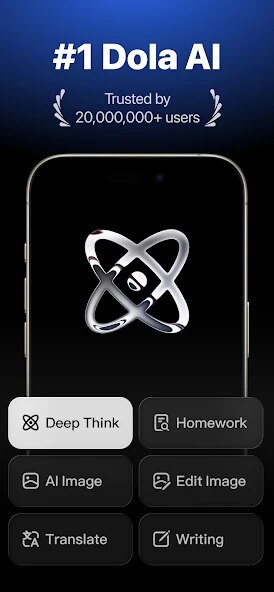
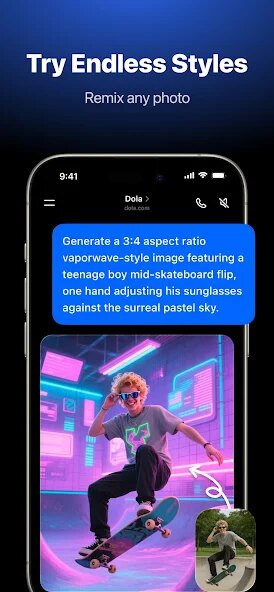
Dola: Smart AI Assistant, created by SPRING (SG) PTE. LTD., aims to be an all-in-one digital helper for people who need to streamline their daily tasks. At its core, the app uses artificial intelligence to handle scheduling, reminders, note-taking, and quick information retrieval. I found it particularly useful for organizing my chaotic work week, where juggling meetings, deadlines, and personal errands used to feel overwhelming. The app essentially acts as a centralized command center for your digital life, learning from your habits to offer smarter suggestions over time.
The target audience is quite broad, but it seems tailor-made for busy professionals, students, and anyone managing a packed schedule. For me, the biggest win was how it tackled the specific problem of scattered information. Before using Dola, I had reminders in three different apps, sticky notes everywhere, and a calendar I barely checked. Now, everything lives in one place. The core scheduling feature works smoothly, letting you create events or reminders with natural language input, like “Remind me to buy groceries tomorrow at 5 PM.” It actually understands context, which is rare for these types of tools. Beyond that, it offers quick web searches, weather updates, and even a basic to-do list—all accessible with voice commands or a few taps.
During my trial, I found that it genuinely saved me time. For instance, instead of manually typing out my grocery list, I just spoke it into the app while driving, and it organized the items automatically. That sort of convenience makes a real difference. However, I will say that while the extra features are nice, they don't always feel essential. The web search function, for example, works fine but doesn't offer anything revolutionary compared to just opening your browser. Still, for someone like me who wants to reduce app clutter, this trade-off is worth it. I recommend this app to anyone who finds themselves constantly switching between tools just to stay on track. It is especially useful for those who prefer voice-driven interaction or struggle with keeping their digital life organized.
features
- 🗓️ Smart Scheduling with Natural Language: This is the feature I relied on most. You can create events or reminders by typing or saying something like “Schedule a dentist appointment next Tuesday at 10 AM and set a reminder an hour before.” The AI interprets the time, date, and action without any extra steps. It even catches conflicts and suggests alternatives, which saved me from double-booking myself more than once.
- 🔍 Quick Information Hub: Dola lets you ask for the latest news, weather forecasts, or even quick calculations without leaving the interface. I used this constantly during my morning routine—checking the weather while simultaneously setting up my day's schedule. It's not replacing Google, but for quick facts, it works reliably.
- 📝 Voice-Activated Note Capture: You can dictate notes hands-free, and the app organizes them into categories automatically. I tested this while cooking: I said “Add milk, eggs, and bread to the shopping list,” and it was done. It even allows you to set priority levels with simple voice commands, which helps when you're multitasking.
pros
- 💡 Intuitive Learning Curve: The app is remarkably easy to start using. Within minutes, I was scheduling tasks and setting reminders without reading a manual. The natural language processing feels fluid, so it doesn't force you to learn rigid commands.
- ⚡ Efficient Time Saver: By consolidating multiple functions into one interface, Dola cuts down the time spent switching between apps. For someone like me, who hates wasted seconds, this was a major win.
- 🔊 Reliable Voice Recognition: Even in noisy environments, the app accurately caught my commands. I tested it while walking down a busy street, and it still understood my grocery list additions without errors.
cons
- ❌ Limited Offline Functionality: When I lost my internet connection during a commute, core features like voice commands and scheduling became unusable. This is a real drawback for travelers or people in areas with spotty coverage.
- 🔋 Occasional Battery Drain: Over prolonged use, especially with voice features active, the app noticeably drained my phone's battery. I had to close it more aggressively than I would have liked.
- 🤔 Redundant Features: Some secondary features, like the embedded web search, feel unnecessary. They work fine but don't add enough value to justify their presence, making the interface slightly busier than needed.
Recommended Apps
![]()
Poe - Fast AI Chat
Quora, Inc.4.7

![]()
Meitu- Photo Editor & AI Art
Meitu (China) Limited4.5![]()
Which Animal Are You?
KDR Games4![]()
Yahoo Mail – Organized Email
Yahoo4.6![]()
Gorilla Skins for Monkey Arena
Dumitru Boico4![]()
Find my Phone - Clap, Whistle
FunGear inc4.4![]()
Meta AI
Meta Platforms, Inc.4.7![]()
TickTock-TikTok Live Wallpaper
TikTok Pte. Ltd.4.5![]()
Kpop Idol Simulator
Brain Freezing3.8![]()
Google Pay
Google LLC4.4![]()
Photo Tool
COLIFER LAB4![]()
Human to Dog Translator
Outlookdaily3.6![]()
Blush: AI Dating Simulator
Blush AI4.3![]()
Face Swap Gender Swap&Changer
Energy apps2.8![]()
Get FFF Daily Diamonds Tips
Reallust Softech0













Hot Apps
-
![]()
Snapchat
Snap Inc4.1 -
![]()
Google Gemini
Google LLC4.6 -
![]()
ChatBot - AI Chat
X PhotoKit4.5 -
![]()
TikTok
TikTok Pte. Ltd.4.4 -
![]()
Signal Private Messenger
Signal Foundation4.5 -
![]()
TikTok - Videos, Shop & LIVE
TikTok Pte. Ltd.4.1 -
![]()
FaceApp: Perfect Face Editor
FaceApp Technology Ltd4.4 -
![]()
PolyBuzz: Chat with AI Friends
CLOUD WHALE INTERACTIVE TECHNOLOGY LLC.3.8 -
![]()
WhatsApp Messenger
WhatsApp LLC4.4 -
![]()
Instagram
Instagram3.9 -
![]()
Ticketmaster-Buy, Sell Tickets
Ticketmaster L.L.C.3 -
![]()
Bolt: Request a Ride
Bolt Technology4.8 -
![]()
Amazon Alexa
Amazon Mobile LLC4.5 -
![]()
Netflix
Netflix, Inc.3.9 -
![]()
GasBuddy: Find & Pay for Gas
PDI Software, Inc.3.1 -
![]()
Domino's Pizza USA
Domino's Pizza LLC4.7 -
![]()
Waze Navigation & Live Traffic
Waze4.2 -
![]()
Uber - Request a ride
Uber Technologies, Inc.4.5 -
![]()
Cash App
Block, Inc.4.6 -
![]()
letgo: Buy & Sell Used Stuff
letgo3.3 -
![]()
ParkMobile: Park. Pay. Go.
Parkmobile, LLC4.3 -
![]()
Affirm: Buy now, pay over time
Affirm, Inc4.7 -
![]()
PayPal - Send, Shop, Manage
PayPal Mobile4.3 -
![]()
Google Maps
Google LLC4.2 -
![]()
Pinterest
Pinterest4.5 -
![]()
Uber Eats: Food Delivery
Uber Technologies, Inc.4.6 -
![]()
Hulu: Stream TV shows & movies
Disney4.5 -
![]()
ChatOn - AI Chat Bot Assistant
AIBY Inc.4.4 -
![]()
YouTube
Google LLC4.1 -
![]()
Microsoft Copilot
Microsoft Corporation4.8






























Disclaimer
1.Apkspack does not represent any developer, nor is it the developer of any App or game.
2.Apkspack provide custom reviews of Apps written by our own reviewers, and detailed information of these Apps, such as developer contacts, ratings and screenshots.
3. All trademarks, registered trademarks, product names and company names or logos appearing on the site are the property of their respective owners.
4.Apkspack abides by the federal Digital Millennium Copyright Act (DMCA) by responding to notices of alleged infringement that complies with the DMCA and other applicable laws.
5.If you are the owner or copyright representative and want to delete your information, please contact us [email protected].
6.All the information on this website is strictly observed all the terms and conditions of Google Ads Advertising policies and Google Unwanted Software policy.
7.Apkspack.com is an independent, information-only website which is 100% free to all the users.